Copilot Cowork ships off by default, which means the readiness work has to happen before anyone flips the switch, not after.
June 2026 | 6 min read
At a Glance
1. What Actually Shipped on 16 June
Copilot Cowork readiness went generally available worldwide on 16 June 2026, three months after entering Frontier preview, where it became the fastest-growing feature in that programme’s history. More than half of the Fortune 500 is already using it, alongside named customers including Accenture, Avanade, Capital Group and Zurich Insurance.
Cowork is built for a different kind of task than Copilot Chat. It executes long-running, multi-tool work end to end and hands back a finished result, not a draft. Point it at a stalled sales pipeline, and it returns a ranked list of at-risk deals with the exact follow-up that went cold on each. Point it at a batch of spreadsheets, and it edits every one of them and produces the dependency chart to go with them. That is the pitch, and for many of the early Frontier customers it held up.
The billing is new too. Cowork requires a Microsoft 365 Copilot seat, and on top of that seat, every task is billed in Copilot Credits. The price of a single task comes from four inputs: which model ran it, how much context it pulled in, how many tools it called, and how long it ran. Pay-as-you-go costs $0.01 per credit, or an organisation can commit to a usage volume upfront for a discount.
2. Off by Default Is Not the Same as Safe by Default
Microsoft built one decision into Cowork’s launch that matters more than any feature on the list: it is off by default. Admins decide when to switch it on and exactly who gets access. That reads like caution. In practice it shifts the entire readiness burden onto IT, because the moment Cowork is enabled for a user, it inherits whatever that user’s account can already see, touch and write to across Microsoft 365.
That is the part most rollout plans miss. An agent that runs for hours across multiple tools does not create new permissions. It exercises every permission that already exists, continuously, at machine speed. If a marketing user has stale access to a finance SharePoint site from a project that wrapped up two years ago, Cowork can use it. If a OneDrive folder still has an external sharing link live from a deal that closed last year, Cowork can read from it. None of that is a flaw in Cowork. It is tenant hygiene debt that switching on an agent simply makes active.
Cowork does not create new exposure. It activates every permission your tenant already forgot it granted, and it does it continuously, not once a quarter.
3. The Five-Point Check Before You Flip the Switch
Run through these five checks against the specific accounts you plan to grant access to, before you touch the on switch:
- Audit permissions on every pilot account first. Stale group memberships and orphaned sharing links are exactly what an agent will use if nobody has cleared them.
- Clear ROT data, redundant, obsolete, and trivial files, from the sites and drives those accounts touch. Less noise means less for an agent to misread, and less exposure if it gets something wrong.
- Check sensitivity label coverage on anything Cowork will be allowed to read. Cowork inherits and displays labels end to end, but only if the content was labelled correctly to begin with.
- Set spend governance before usage starts. Cowork’s cost tools let admins cap spend at the tenant, group and user level and configure usage alerts; set these before day one, not after the first invoice.
- Scope the pilot deliberately. Start with a defined set of users and tasks rather than a tenant-wide switch, and use the pilot to learn what your real permissions and data exposure look like before scaling further.
4. The Security Stack at GA, and the Gap Still Open
Microsoft shipped a genuinely strong compliance surface alongside Cowork. Audit log, Data Security Posture Management, eDiscovery, Insider Risk Management, Data Lifecycle Management, and Communication Compliance are all live at general availability, and sensitivity labels travel with content end to end. For most governance teams, that is a stronger starting position than agent tooling has offered so far.
Named gap at GA:
RISK: Data Loss Prevention for Copilot Cowork is listed as “coming soon,” not shipped. Until it lands, Cowork operates without the one control most enterprises rely on to stop sensitive data leaving the tenant through a new channel. Treat every pilot user as if DLP is not there yet, because it is not.
5. Why Readiness Has to Come Before Rollout
None of this is an argument against turning Cowork on. The productivity case is real, and waiting for perfect conditions means waiting indefinitely. The argument is about sequencing. Microsoft Provides Controls. We Provide Control. The native cost dashboards and security toggles ship with the product. What they do not do is tell you, before you flip the switch, exactly which permissions are stale, which files are oversharing, and which licences are already wasted on the users you are about to hand an agent to.
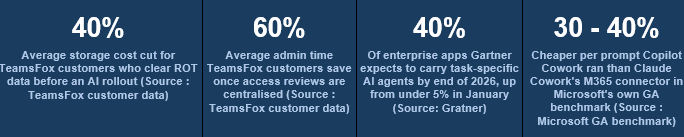
That is the work TeamsFox customers have already automated for every other Microsoft 365 rollout. The same engine that strips ROT data out of SharePoint and OneDrive to cut storage costs by 40% on average is the engine that shows what an agent would be able to see if you switched it on today. The same permissions hygiene that drives a 60% cut in admin time by centralising access reviews is what stops Cowork inheriting two years of forgotten sharing links. Competitors Surface Signals. We Surface Evidence. Knowing a site “looks risky” is not the same as knowing exactly which files an agent could read tomorrow morning, which is the difference Copilot readiness work is meant to close.
Frequently Asked Questions
What is Copilot Cowork Readiness, and when did it become generally available?
Copilot Cowork is Microsoft’s agentic system for long-running, multi-tool tasks inside Microsoft 365. It became generally available worldwide on 16 June 2026 after three months in Frontier preview.
Is Copilot Cowork switched on automatically for Microsoft 365 Copilot users?
No. Cowork is off by default. Admins must enable it deliberately and choose which users get access before anyone in the tenant can use it.
How is Copilot Cowork billed?
Users need a Microsoft 365 Copilot seat. Cowork tasks are then billed separately in Copilot Credits, priced on the model used, context retrieved, tool calls made and runtime. Pay-as-you-go costs $0.01 per credit.
Does Copilot Cowork include Data Loss Prevention at launch?
No. DLP is listed as “coming soon” at general availability. Audit log, DSPM, eDiscovery, Insider Risk Management, Data Lifecycle Management and Communication Compliance are live.
What should IT teams check before enabling Copilot Cowork Readiness?
Permissions on pilot accounts, ROT data in the sites those accounts touch, sensitivity label coverage, spend governance limits, and a deliberately scoped pilot group rather than a tenant-wide switch.
Conclusion
Cowork’s general availability is a genuine step forward for what Microsoft 365 can automate, and the early customer results back that up. But the headline safety feature, off by default, is really a deadline for IT rather than a safety net. It buys a window before usage ramps. It does not close the gap between what an agent can technically reach and what IT actually wants it to reach.
The risk was never really the AI. It is what the AI inherits the moment someone turns it on: years of permission grants nobody revisited, storage nobody cleaned up, and licences nobody right-sized. Cowork does not introduce that debt. It just starts acting on it immediately and at a pace no quarterly access review will catch in time.
TeamsFox customers run that cleanup before the agent ever touches a tenant, not after the first incident. The same automation that finds redundant, obsolete, and trivial data and strips it out of storage is the automation that tells an IT team exactly what an agent pointed at that data would be able to see.
Turn Cowork on. Just do the readiness work first, while the switch is still in your hands and not the agent’s.
Ready to see this in your tenant?
Run a free TeamsFox M365 analysis, no contract, no account changes. You will see your licence, storage, and governance exposure within 30 minutes.
About TeamsFox
TeamsFox GmbH is a Franco-German Microsoft 365 management platform that gives IT teams tenant-wide visibility across licensing, storage and governance. Customers cut licence costs by 30%, reduce admin time by 60%, and lower storage costs by 40%. TeamsFox is trusted in more than 20 countries across Europe, MENA and Asia.