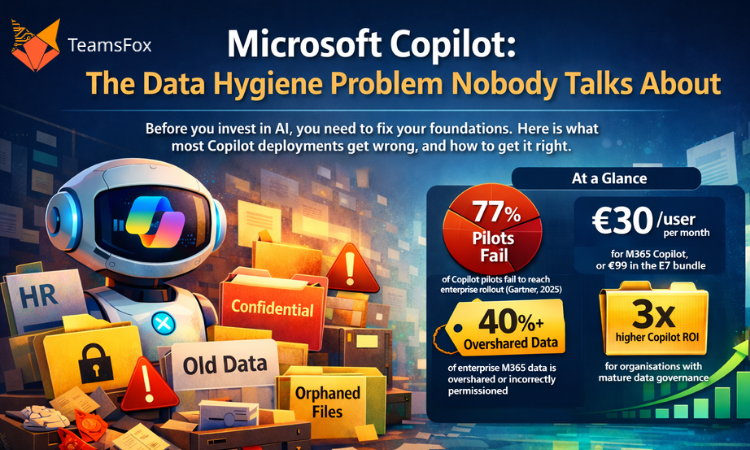
Before you invest in AI, you need to fix your foundations. Here is what most Copilot deployments get wrong, and how to get it right.
March 2026 | 5 min read
At a Glance

Microsoft Copilot for Microsoft 365 is one of the most significant productivity investments an organisation can make this decade. The promise is real: AI-assisted drafting, instant meeting summaries, data insights from natural language queries, automated workflows. For organisations with mature, well-governed Microsoft 365 tenants, Copilot delivers.
The main challenge is that most tenants lack the necessary foundation for Microsoft Copilot Readiness.
When organisations rush into Copilot deployment without addressing the underlying data hygiene, permissions architecture, and governance maturity of their tenant, three things tend to happen. Copilot surfaces sensitive data to people who should not see it. Users lose trust in the outputs because the AI is drawing from stale or incorrect information. And the ROI case falls apart. The deployment stalls. Licences go unused. The project gets shelved.
This is not a hypothetical risk. Gartner research consistently finds that the majority of AI assistant pilot programmes fail to reach full enterprise rollout, and data quality is the number one cited reason.
The fix is not complicated, but it requires honesty about where most Microsoft 365 tenants actually stand, and a structured approach to closing the gaps before Copilot goes live.
1. What Copilot Actually Does With Your Data
Microsoft Copilot for Microsoft 365 is a large language model integrated directly into the Microsoft 365 ecosystem. When a user asks Copilot a question, say ‘Summarise the latest project updates’ or ‘Draft a proposal based on our pricing documents’, Copilot retrieves relevant content from across the tenant: SharePoint, Teams, OneDrive, Exchange, and connected data sources.
Critically, Copilot respects existing Microsoft 365 permissions. It will not surface content that a user cannot already access. But this is where the problem begins: In most Microsoft 365 tenants, Microsoft Copilot readiness permissions are far wider than they should be.
Copilot does not create new security gaps. It amplifies existing ones. If a sensitive HR document is accessible to the entire company, Copilot will happily summarise it for anyone who asks. The AI is working exactly as designed. The problem is the permissions architecture underneath it.
Oversharing in Microsoft 365 is widespread. Teams sites created with default access settings. SharePoint libraries shared with all authenticated users. Sensitive documents stored in departmental sites with overly broad membership. Guest access granted for a project and never revoked. In many tenants, a significant portion of sensitive content is accessible to far more people than intended, and often nobody has noticed because nobody has ever mapped it.
Copilot will surface all of it.
2. The Four Data Hygiene Failures That Derail Microsoft Copilot Readiness:
Failure 1: Overpermissioned Content
The most immediate risk. Sensitive documents such as HR records, salary data, board papers, merger discussions, and personal data are accessible to users who should not see them because permissions were never properly configured or maintained. Copilot will retrieve and present this content to anyone with access. The first time it does, trust collapses.
Failure 2: ROT Data Contaminating AI Outputs
Copilot draws from what exists in the tenant. If your SharePoint contains outdated pricing documents from 2019, superseded policy documents, draft strategies that were never approved, and duplicate versions of the same report, Copilot will treat all of it as current information. The AI cannot tell the difference between an approved 2026 strategy document and an abandoned 2022 draft, unless your data has been cleaned and properly labelled.
ROT data (Redundant, Obsolete, Trivial) directly degrades the quality of Copilot’s outputs. Users who receive answers based on stale data lose confidence quickly. And unlike a traditional search, where users can see that a document is from 2019 and discount it, Copilot synthesises content into a response that looks authoritative. The contamination is invisible.
Failure 3: Missing or Inconsistent Sensitivity Labels
Microsoft Information Protection sensitivity labels are the foundation of data governance in M365. When applied correctly, they classify content by sensitivity level, enforce protections automatically, and give Microsoft Copilot Readiness context about what kind of data it is working with. When labels are absent, inconsistent, or misapplied, that entire layer of governance disappears.
Most organisations have partial labelling at best. They applied labels to a subset of content when they first configured Microsoft Security Information Protection, never extended it consistently, and have since accumulated large volumes of unlabelled content. Copilot operates without that governance context.
Failure 4: Orphaned and Unowned Content
When employees leave an organisation, their content, including files, Teams channels, SharePoint sites, and shared mailboxes, rarely disappears cleanly. Without lifecycle management processes, it lingers: orphaned, unowned, and often invisible to IT. That content remains fully accessible to Copilot, and nobody is accountable for its accuracy or appropriateness.
3. The Readiness Framework: Five Things to Fix Before You Deploy
Microsoft Copilot readiness is not a binary state. It is a maturity level. Organisations that invest in Microsoft Copilot readiness before deployment report consistently higher ROI and faster adoption. The five areas below have the highest impact on Copilot deployment outcomes.
Step 1: Map and Remediate Oversharing
Conduct a permissions audit across SharePoint, Teams, and OneDrive. Identify sites and libraries with overly broad access, particularly anything shared with all authenticated users or with large security groups that include sensitive content. Revoke unnecessary guest access. Apply least-privilege principles consistently.
This is the single highest-impact action you can take before enabling Copilot. It is also the most time-consuming to do manually.
Step 2: Clean Up ROT Data
Run a ROT data analysis before Copilot goes live. Identify files that have not been accessed in 12 months or more, duplicate documents across sites, and obsolete content from closed projects. Archive or delete what no longer serves a current purpose. This directly improves the quality of Microsoft Copilot readiness outputs.
Step 3: Extend Sensitivity Labels Consistently
Review your Microsoft Security Information Protection labelling coverage. Identify the volume of unlabelled content across the tenant, and run a labelling campaign, automated where possible and manual for high-sensitivity content. Labels should cover at least four categories: Public, Internal, Confidential, and Highly Confidential. Copilot uses label metadata to apply appropriate protections.
Step 4: Implement Lifecycle Management for Orphaned Content
Define and enforce a content lifecycle policy. When employees leave, their content should be reviewed, reassigned, or archived within a defined window. When projects close, the associated Teams and SharePoint content should be archived or deleted. This stops the accumulation of orphaned content that degrades Copilot’s knowledge base over time.
Step 5: Establish Copilot Usage Analytics and Monitoring
Once Copilot is live, monitor usage patterns and outputs. Track which data sources Copilot draws from most frequently, which users are engaging, and whether sensitive content is being surfaced in unexpected contexts. Usage analytics are essential for catching Microsoft governance gaps that the pre-deployment audit missed.
4. The Cost of Skipping Readiness
The Risk Is Real :
A 2024 study found that organisations deploying AI assistants without Microsoft governance preparation were three times more likely to experience an unintended data exposure incident in the first six months. The incident does not have to be a full data breach to cause damage. A Copilot response that reveals salary information to the wrong user, or surfaces a confidential M&A document in a general Teams conversation, is enough to suspend the entire deployment.
Beyond the security risk, there is the ROI risk. Microsoft Copilot for Microsoft 365 costs EUR 30 per user per month at standalone pricing, or is bundled in the new E7 Frontier Suite at EUR 99 per user per month. At those price points, every user who disengages because Copilot’s outputs are unreliable represents a significant wasted investment.
Readiness is not overhead. It is the investment that makes the primary investment worthwhile.
5. What Good Readiness Looks Like in Practice
Organisations that successfully deploy Copilot at scale share a common profile. Their permissions architecture reflects the principle of least privilege. Their data estate has been cleaned of ROT content within the past 12 months. Their sensitivity labelling covers at least 80% of the content. They have lifecycle management processes that prevent orphaned content from accumulating. And they have monitoring in place to catch and remediate issues as the deployment matures.
This is not a description of a perfect tenant. It is a description of a governable one. The difference matters. Perfection is not the goal. Governance is.
Organisations that reach this profile do not just have better Copilot outcomes. They have lower licence costs, a stronger compliance posture, reduced data breach risk, and more efficient IT operations. Microsoft Copilot readiness is the forcing function that accelerates the governance work many IT teams have been deferring for years.
Conclusion
Microsoft Copilot for M365 is a genuine productivity multiplier for tenants that are ready for it. For tenants that are not, it becomes an amplifier of existing governance failures.
The data hygiene problem that Copilot exposes is not new. Oversharing, ROT data, missing sensitivity labels, and orphaned content have been accumulating in Microsoft 365 tenants since the platform launched. What Copilot does is make the cost of that accumulation visible and immediate.
The organisations that will get the most from Copilot in 2026 are the ones that used the lead-up time to get their data in order. That work starts with visibility: understanding what you have, who can access it, and whether it should still exist.
From there, the path to Microsoft Copilot readiness is straightforward. The technology is not the hard part. The data is.
About TeamsFox
TeamsFox GmbH helps organisations prepare their Microsoft 365 tenants for Copilot and AI adoption through data governance, permissions remediation, storage optimisation, and lifecycle management. Our Microsoft Copilot Readiness module gives IT teams the visibility and automation to close Microsoft governance gaps before they become deployment blockers. www.teamsfox.com