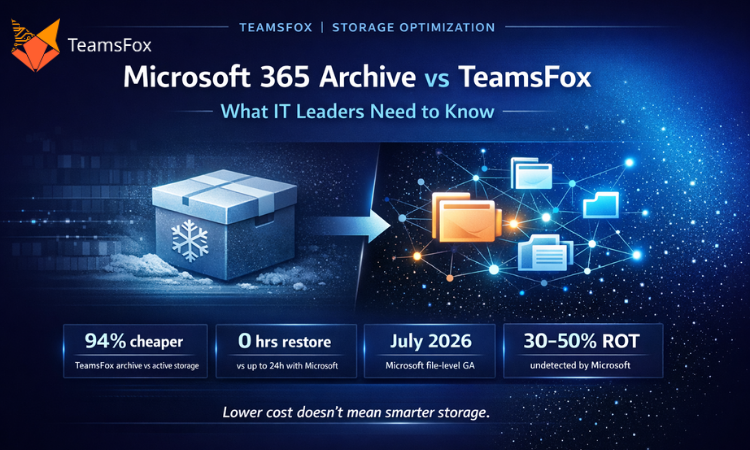
Microsoft offers archive storage at a lower price. But lower cost and smart archiving are not the same thing.
March 2026 | 5 min read
At a Glance

Microsoft 365 Archive launched with a straightforward proposition: move inactive SharePoint archiving content to a lower-cost storage tier and pay less. At $0.05/GB/month, it is a 75% reduction on standard SharePoint extra storage pricing. For IT managers evaluating SharePoint archiving options under pressure to cut costs, that sounds like a win.
But pricing is only one part of the story. The harder question is whether Microsoft Archive actually helps organisations manage their storage intelligently, or whether it just makes it cheaper to keep accumulating data they have not thought about.
This article breaks down exactly where Microsoft 365 Archive falls short, what TeamsFox does differently, and how to decide which SharePoint archiving approach makes sense for your organisation.
1. What Microsoft 365 Archive Actually Does
Microsoft 365 Archive is a storage tier built into SharePoint. When you archive a site, Microsoft moves that site’s content to a lower-cost Azure backend. The content stays within Microsoft’s infrastructure, it can still be found by administrators, and it can be restored if needed.
Currently, archiving operates at the site level. A public preview of file-level archiving launched in March 2026 and is due to reach general availability in July 2026. Policy-driven automation, which would let admins define rules to archive content automatically after a set period of inactivity, is on the roadmap for later in 2026.
For now, Microsoft Archive is a manual tool. An administrator identifies a site, decides to archive it, and takes action. There are no policies, no detection of what should be archived, and no connection to the rest of your governance workflows.
Microsoft 365 Archive offers a cheaper storage tier. What it does not offer is intelligence about what to put there, when to do it, or how that connects to the rest of your Microsoft 365 governance.
2. Microsoft 365 Archive Limitations: What IT Leaders Need to Know
No ROT Detection
The biggest gap in Microsoft Archive is the absence of any mechanism to identify what should actually be archived. ROT data (Redundant, Obsolete, and Trivial content) makes up between 30 and 50% of the average enterprise Microsoft 365 tenant. Files nobody has opened in years, duplicated documents, superseded policy drafts, abandoned project folders.
Microsoft Archive doesn’t know any of that exists. It can’t tell you which sites are full of stale content, which files haven’t been touched in two years, or which documents are duplicated across six different libraries. That analysis is left entirely to the administrator.
Without that detection layer, archiving becomes guesswork. Administrators archive sites they suspect are inactive, miss others, and have no data-backed way to prioritise. The cost savings are real but smaller than they could be, because the right content isn’t always being targeted. We covered the scale of this problem in The Data Hygiene Problem Nobody Talks About.
Restore Delays
Microsoft Archive offers instant restoration for content archived in the last seven days. After that window, rehydration takes up to 24 hours regardless of file size. For a single document someone urgently needs, that wait is a real operational problem.
There’s no express restore option and no way to reduce that window for critical content.
Search and Copilot Exclusion
Archived content is excluded from standard Microsoft 365 search results. It also falls outside the scope of Microsoft Copilot. If your organisation is rolling out or planning for Copilot, content that archived through Microsoft’s native tool is simply invisible to the AI.
For organisations trying to maximise their Copilot investment, this creates a real tradeoff: archive to save money, but reduce the knowledge base your AI can draw from.
No Analytics or Forecasting
Microsoft 365 Archive gives you no visibility into your storage trajectory. You can’t see which departments are growing fastest, what your current growth rate will cost at the next renewal, or how much you could save by archiving specific content. There’s no dashboard, no forecast, no savings estimate before you act.
3. How TeamsFox SharePoint Archiving Works Differently
TeamsFox Storage Optimisation is built on a different premise: before you archive anything, you need to understand what you have. That understanding is what makes the archiving meaningful.
Detection First
TeamsFox scans your entire tenant at file level and identifies ROT and stale data. You see exactly which files haven’t been modified in a set period, which documents are duplicated across sites, and which libraries have accumulated content from projects that closed years ago.
That analysis happens before any archiving decision is made. You’re not guessing what to archive. You have data.
Automated Policies, Not Manual Decisions
Once you define your archiving criteria, TeamsFox enforces them automatically on a configurable schedule. Content that meets the threshold for inactivity, redundancy, or project closure moves to Azure Cool Storage without manual intervention. Policies run continuously, which means storage governance doesn’t depend on an administrator remembering to review things periodically. Microsoft’s policy-driven automation is planned for later in 2026. TeamsFox has it now.
Immediate Restore, No Rehydration Window
Content archived through TeamsFox can be restored immediately at any time. There’s no 24-hour wait, no seven-day window, no operational disruption. Users and administrators can retrieve what they need when they need it.
Search and Copilot Continuity
TeamsFox preserves the metadata index for archived content. Files remain discoverable in Microsoft 365 search and visible to Copilot even after archiving. Organisations don’t have to choose between cost optimisation and AI readiness.
Governance Integration
TeamsFox connects archiving to your broader lifecycle management workflows. When a project closes, when a user leaves, or when a team is decommissioned, TeamsFox can automatically trigger archiving and cleanup for the associated content. Archiving becomes part of a continuous governance process, not a periodic manual task.
In one real customer analysis, this approach identified 43TB of recoverable storage across a 5,000-user tenant, driving over €705,000 in projected 5-year savings from inactive files alone. The full breakdown of that business case is in our article How TeamsFox Eliminates Storage Waste in Microsoft 365.
4. Microsoft 365 Archive vs TeamsFox: Full Feature Comparison
| Microsoft 365 Archive | TeamsFox Archive | |
|---|---|---|
| Storage cost | $0.05/GB/month (approx. 75% cheaper than standard SharePoint) | ~€0.012/GB/month via Azure Cool Storage, approximately 94% cheaper than active SharePoint storage |
| Restore speed | Instant within first 7 days. After that, rehydration takes up to 24 hours regardless of file size | One-click restore, available immediately at any time with no rehydration delay |
| Automation | Manual only in current release. Policy-driven automation announced for end of 2026 | Automated policies run on a configurable schedule with no manual intervention required |
| ROT and stale detection | No built-in identification of inactive, redundant, or obsolete content. Admins must decide what to archive without data support | Full file-level visibility into stale and ROT data, so archiving targets the right content and savings are maximised |
| Search and Copilot | Archived content is excluded from search results and Copilot queries | Metadata index is preserved, keeping archived files discoverable in search and accessible to Copilot |
| Storage analytics | No storage analytics, savings forecasting, or growth analysis included | Built-in dashboard showing saving potential, growth trends, and cost forecasting before any action is taken |
| Version handling | All file versions retained and restored together as a package | Version-level archiving with selective restore options |
| Governance integration | Standalone feature, not connected to lifecycle or offboarding workflows | Integrated with lifecycle management, triggering cleanup automatically when users leave or projects close |
5. Which SharePoint Archiving Solution Is Right for You?
Microsoft 365 Archive is a reasonable option if your primary goal is reducing the per-GB cost of cold storage and you’re comfortable making manual decisions about what to archive. It works best for organisations that have relatively clear visibility into their inactive sites and don’t need automated policies or integrated governance.
TeamsFox is a better fit if you need to understand what should be archived before you act, if your team doesn’t have capacity for manual archiving reviews, or if you need archiving to connect to your lifecycle and offboarding processes. It also suits organisations investing in Copilot who can’t afford to sacrifice search coverage for cost savings.
The two approaches aren’t mutually exclusive. TeamsFox uses Azure Cool Storage as its archiving backend, which means organisations get intelligent detection, automated policies, and governance integration while still benefiting from low-cost Azure storage pricing. There’s no reason to choose one over the other.
Conclusion
Microsoft 365 Archive is a genuine cost-reduction tool. A 75% reduction in storage costs for inactive content is meaningful, and the roadmap shows Microsoft investing in making it more capable over time. But it’s an archive tier, not a storage governance solution.
It doesn’t detect what should be archived. It doesn’t automate the process. It doesn’t connect to lifecycle management. It excludes archived content from search and Copilot. And it doesn’t reduce your storage quota.
For organisations that want to do more than reduce the cost of data they’ve already decided to keep, the gap between a cheaper storage tier and intelligent SharePoint archiving governance is significant. That gap is where TeamsFox operates.
Storage optimisation isn’t about finding a cheaper place to put your data. That’s the problem TeamsFox is built to solve.
About TeamsFox
TeamsFox GmbH is a Microsoft 365 management and optimisation platform headquartered in Düsseldorf, Germany. We help IT teams take control of licensing, storage, governance, and Copilot readiness across their Microsoft 365 tenants. Trusted in 20+ countries across Europe, MENA, and Asia. www.teamsfox.com