
Reduce your Microsoft 365 storage costs by up to 40%, without changing how your users work.
March 2026 | 6 min read
At a Glance

For most Microsoft 365 tenants, storage isn’t a managed asset. It’s an accumulation. SharePoint sites fill up with outdated documents, duplicate files, and stale content from projects that closed years ago. And every gigabyte adds to your SharePoint Online storage costs, whether the data is useful or not.
The average enterprise Microsoft 365 tenant contains tens of millions of files. Studies consistently show that between 30 and 50 percent of that data is ROT: Redundant, Obsolete, or Trivial. Your organisation is paying full SharePoint Online storage pricing for data that delivers zero business value.
TeamsFox Storage Optimization changes that. It gives IT teams the visibility to find the waste, the tools to prioritise what to act on, and the automation to move, archive, or clean up data at scale without disrupting a single end user.
1. The Hidden Cost of Unmanaged Microsoft 365 Storage Optimization
Microsoft 365 storage costs are easy to overlook. They’re often bundled into existing subscriptions, spread across SharePoint and Teams, and rarely broken out as a distinct line item in the IT budget.
But that bundled cost is not fixed. As tenants grow, as teams collaborate more heavily, as file sizes increase and retention policies are absent or inconsistently applied, storage consumption compounds. When organisations hit Microsoft’s included storage limits, they buy additional capacity, typically in large blocks and with little analysis of whether the underlying data is actually worth keeping.
The root cause is nearly always the same: no visibility. IT teams can’t clean up what they can’t see. Without a clear picture of what exists, who owns it, when it was last accessed, and whether it still serves a current business purpose, storage management defaults to buying more.
The average Microsoft 365 tenant wastes between 30 and 50% of its storage on ROT data: files that are Redundant, Obsolete, or Trivial. TeamsFox makes this visible at the file level, not just the site level.
2. Identifying ROT Data: What TeamsFox Surfaces in Your Tenant
TeamsFox provides tenant-wide storage analytics with file-level granularity. IT administrators don’t just see how much storage is consumed. They see exactly where it sits, why it exists, and what’s safe to act on.
ROT and Stale Data Analysis
Most of what sits in SharePoint is either stale or has no business value anymore. It’s just never been looked at closely enough to act on. TeamsFox does that work, scanning SharePoint and Teams and surfacing exactly what’s driving M365 storage management costs:
- Inactive Files: files that haven’t been modified for a certain period of time
- Outdated Versions: file versions that have been sitting inactive beyond a set threshold
- Excessive Versions: files with more versions than needed, most of which will never be accessed but still count against your storage quota
- Redundant Files: duplicate files with the same name and size sitting across different locations
- Obsolete Files: files using legacy extensions
- Trivial Files: log files, cache files, and other system-generated content
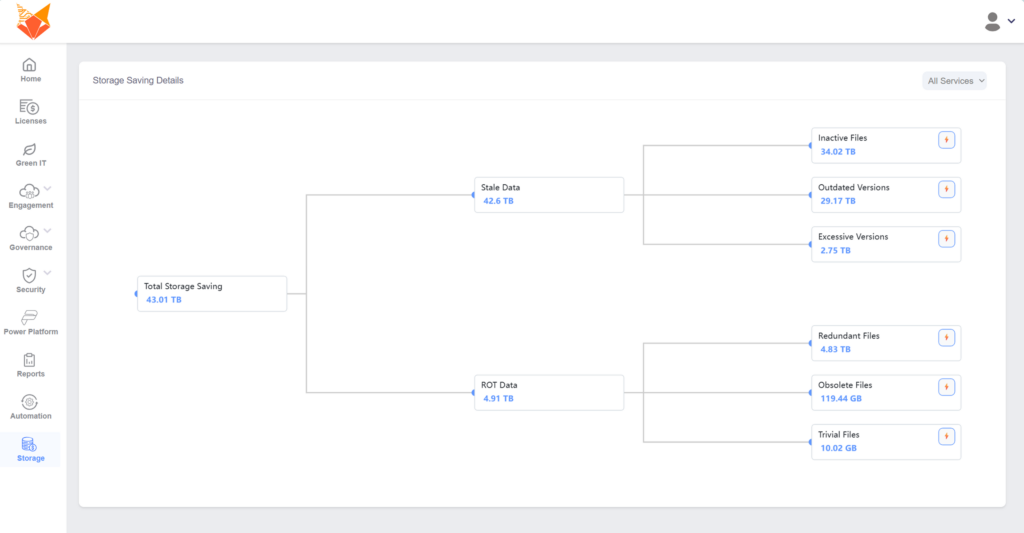
Each category is quantified in real terabytes across your tenant. Selecting any category shows the actual files behind the number, with direct links, file size, version count, and last modified date, so teams have the full picture before taking any action.
Storage Trends and Forecasting
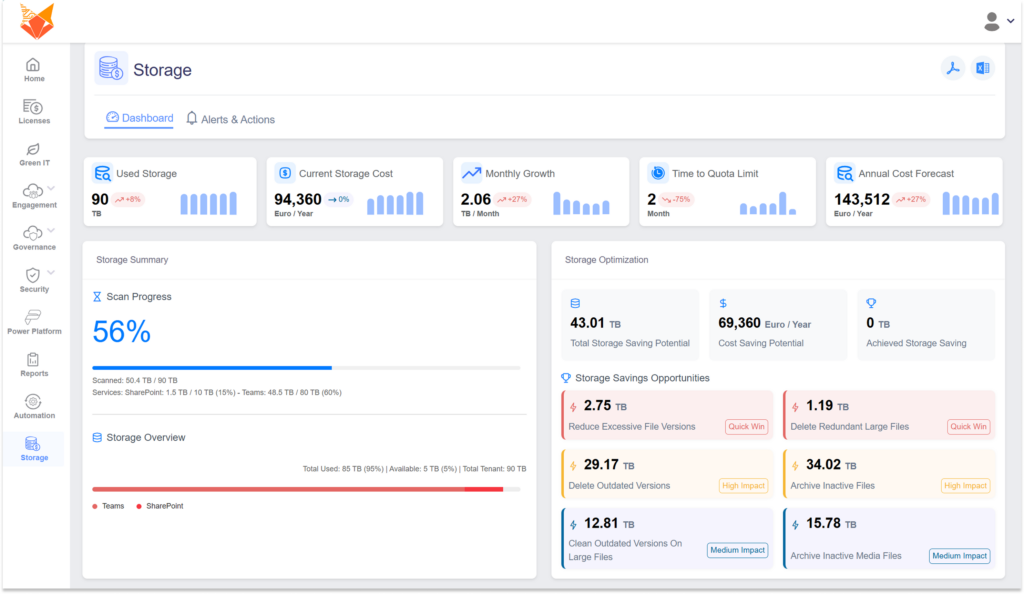
Beyond the current snapshot, TeamsFox tracks storage growth over time. IT teams can see which sites or departments are growing fastest and model what current growth rates will cost at the next renewal. That turns storage from a reactive cost into something you can actually plan around. IT leaders can act before capacity limits force an emergency purchase.
Ownership and Accountability
One of the most persistent problems in Microsoft 365 storage costs management is the absence of ownership. Files exist without clear owners. Sites were created by people who have since left the organisation. TeamsFox maps file ownership across the entire tenant and flags orphaned content: files and sites with no active owner that are invisible to standard housekeeping routines.
3. From Visibility to Action
Visibility on its own is not enough. TeamsFox converts storage intelligence into automated action.
Automated Archiving to Azure Cool Storage
Files that meet TeamsFox’s configurable criteria — such as content last modified more than 12 months ago, flagged as inactive, or linked to closed projects — can be automatically archived to Azure Cool Storage. This moves them out of expensive active SharePoint storage and into significantly cheaper long-term storage, while keeping them fully retrievable whenever someone needs them.
The cost difference is substantial. SharePoint Online costs around €2,458 per terabyte per year. Azure Cool Storage costs around €144. That’s a 94% saving on every terabyte of stale data that gets moved. For a deeper comparison of how this stacks up against Microsoft’s own archiving option, see Microsoft 365 Archive vs TeamsFox.
| Storage Type | Yearly Cost / TB | Notes |
|---|---|---|
| SharePoint Online | €2,458 | Active tier |
| Azure Cool Storage | €144 | 94% cheaper |
The result is immediate cost reduction with no data loss. Files are preserved. Users can still access them. But the organisation stops paying premium SharePoint Online storage pricing for data it no longer actively uses.
User-Safe Restores and Policy-Driven Automation
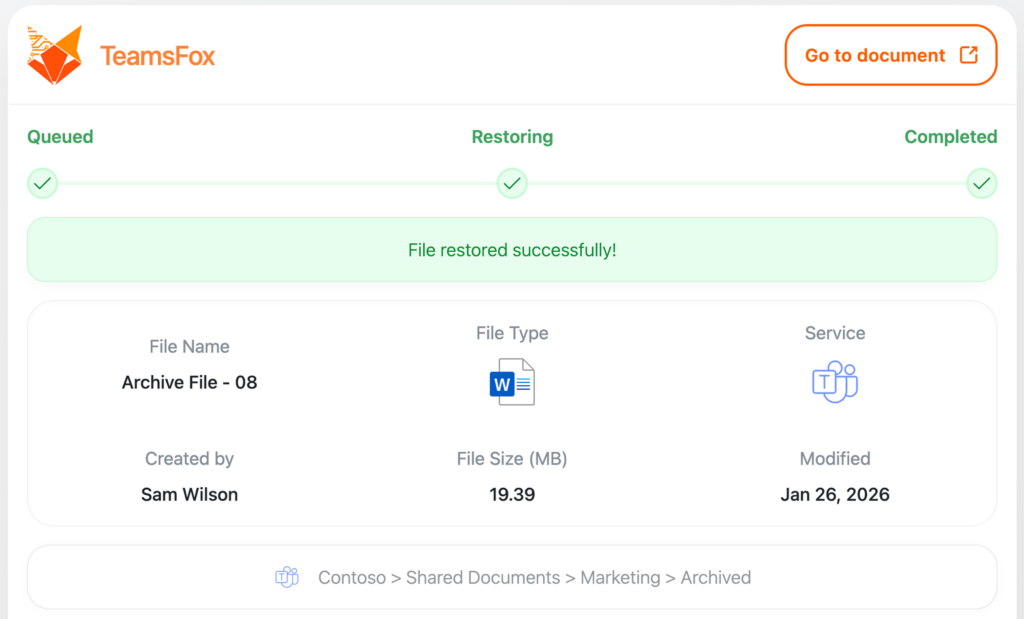
Archiving tends to get skipped because it feels risky. TeamsFox removes that hesitation. Inactive files move to Azure Cool Storage but remain visible in SharePoint and Teams, clearly labelled as archived. Nothing disappears, nothing breaks, and no workflows are disrupted.
When a user needs a file back, they restore it themselves with one click. The file returns with original content, metadata, and permissions intact. No ticket, no admin involvement, no friction.
IT teams configure the policies once. TeamsFox enforces them continuously. Storage governance no longer depends on periodic manual reviews or individual administrator action. Policies run on schedule, ROT and stale data get caught early, and SharePoint storage costs stay under control without the ongoing manual effort.
Lifecycle Management Integration
Storage optimisation in TeamsFox connects directly to lifecycle management. When a project closes, when a user leaves, or when a team is decommissioned, TeamsFox automatically triggers storage cleanup for the associated content. Sites don’t linger indefinitely. They’re handled as part of a controlled offboarding and lifecycle process.
4. The Business Case: Saving €700,000 Over 5 Years
A typical large organisation with 5,000 Microsoft 365 users accumulates 90TB of SharePoint storage, with a storage bill already at roughly €94,000 a year. At Microsoft’s commercial storage prices, unmanaged accumulation adds up fast and compounds at every renewal.
When TeamsFox ran the analysis on a tenant at this scale, 34TB came back as inactive files — content that hadn’t been modified in over a year, still sitting in premium SharePoint storage, still being billed at full price.
Archiving that 34TB to Azure Cool Storage changes the numbers significantly:
| Inactive Files + Versions | Yearly Cost (1TB) | Yearly Cost | |
|---|---|---|---|
| SharePoint | 34 TB | €2,458 | €83,558 |
| Azure Cool Storage | 34 TB | €144 | €4,896 |
| Yearly saving | €78,662 |
That’s nearly €79,000 saved in year one from inactive files alone, without deleting anything. Files are archived, not gone. Users can still get to them with one click.
But that figure assumes static storage. At 2TB of monthly growth, the gap between doing nothing and archiving consistently compounds every year. The table below shows how that plays out over five years:
| Year | Total Storage | Without TeamsFox | With TeamsFox | Yearly Saving | Cumulative Saving |
|---|---|---|---|---|---|
| Year 1 | 114 TB | €280,212 | €180,710 | €99,502 | €99,502 |
| Year 2 | 138 TB | €339,204 | €218,876 | €120,328 | €219,830 |
| Year 3 | 162 TB | €398,196 | €257,042 | €141,154 | €360,984 |
| Year 4 | 186 TB | €457,188 | €295,208 | €161,980 | €522,964 |
| Year 5 | 210 TB | €516,180 | €333,374 | €182,806 | €705,770 |
| 5-Year Total | €705,770 |
Based on 2TB monthly growth, 38% inactive ratio, SharePoint at €2,458/TB and Azure Cool Storage at €144/TB per year.
By year five the cumulative saving reaches over €700,000, and the annual cost difference between the two paths has nearly doubled compared to year one. That figure doesn’t include what gets recovered from cleaning up redundant files, excessive versions, or trivial content. Those add to the saving on top.
TeamsFox customers also report 60% reductions in admin time spent on storage tasks. For a team at this scale, that’s a significant number of hours redirected to work that actually matters.
Storage waste isn’t a technical problem. It’s a visibility and governance problem. When you can see your ROT and stale data at file level, act on it without disrupting users, and keep it from coming back, the cost takes care of itself.
5. TeamsFox vs. Native Microsoft 365 Admin Tools
Microsoft 365 includes basic storage reporting. The SharePoint admin centre shows site usage and storage limits. But these tools are built for observation, not action.
They show totals. They don’t identify which specific files are stale or obsolete. They don’t surface ROT data at the file level. They don’t map ownership across the tenant, archive automatically, forecast future costs, or alert when thresholds are getting close. Administrators are left to act manually on the basis of incomplete information. If you’re also evaluating Microsoft’s native archiving option, the same gap applies there too.
TeamsFox’s position is straightforward: Microsoft provides controls. We provide control. The difference is between a report that tells you storage is high and a system that tells you exactly which files are stale, redundant, or obsolete, and then acts on them automatically.
Conclusion
Reducing SharePoint storage costs is not a technical problem. It’s a visibility and governance problem. When IT teams can see their SharePoint storage estate at file-level granularity, understand what’s stale and what’s genuinely ROT, and automate cleanup based on configurable policies, the waste disappears. So do the SharePoint Online storage costs.
TeamsFox Storage Optimization is built to do exactly that. It turns storage from an unmanaged cost centre into a governed, optimised asset, reducing spend by up to 40% and freeing administrators from the manual work that native Microsoft tools leave behind. The data is there. The cost is real. The fix is automated.
About TeamsFox
TeamsFox GmbH helps organisations govern and optimise their Microsoft 365 environment through storage optimisation, licence management, governance, and Copilot readiness. Our Storage Optimization module gives IT teams the visibility and automation to eliminate waste before it compounds. www.teamsfox.com