Why Every Organization Needs to Be Ready to Copilot?
The answer lies in conducting a Copilot Readiness Assessment — a strategic evaluation of your digital landscape that determines whether your Microsoft 365 environment is secure, efficient, and optimized for AI.
Microsoft Copilot is not just another add-on — it’s a transformative force for modern workplaces. As AI becomes integral to daily operations, many IT leaders are asking the same question: “Is our organization truly ready for Microsoft Copilot?” The answer lies in a Copilot Readiness Assessment.
A Copilot Readiness Assessment isn’t just a checklist; it’s a strategic process to evaluate your digital ecosystem, data hygiene, governance, and security posture to ensure you’re ready to embrace this AI-driven assistant. For IT decision-makers, this assessment is the foundation for deploying Copilot responsibly and effectively.
What is a Copilot Readiness Assessment?
A Copilot Readiness Assessment is not just a checklist — it’s a comprehensive audit of your Microsoft 365 ecosystem. It measures how well your infrastructure, data governance, access controls, and security posture support a safe and efficient Copilot rollout.
Think of it as your blueprint to becoming Ready to Copilot. It involves:
- Evaluating access rights and permissions
- Identifying and cleaning up redundant, obsolete, and trivial (ROT) data
- Assessing governance and compliance maturity
- Optimizing licensing for ROI
With a clear Copilot readiness strategy in place, IT leaders can deploy AI with confidence, without risking compliance, security, or budget.
TeamsFox, for example, assists enterprises in performing granular analysis of user access and licensing. Clients who’ve used TeamsFox for their readiness journey discovered redundant and trivial data lurking in Teams, SharePoint, and OneDrive — data that would otherwise have been surfaced to Copilot.
Why Copilot Readiness Matters for IT Leaders?
Launching Copilot without preparation can expose your organization to risks like:
- Data leaks due to poor access management
- Compliance violations tied to unstructured data
- Poor ROI from deploying licenses where not needed
- Confusing AI output due to data sprawl and ROT content
As an IT leader, your role is to enable innovation without sacrificing control. A Copilot Readiness Assessment ensures your house is in order before inviting a powerful AI assistant in.
Key Components of a Copilot Readiness Assessment
1- Data Inventory and ROT Cleanup
Where is your sensitive data? Is it well-classified and accessible only to those who need it?
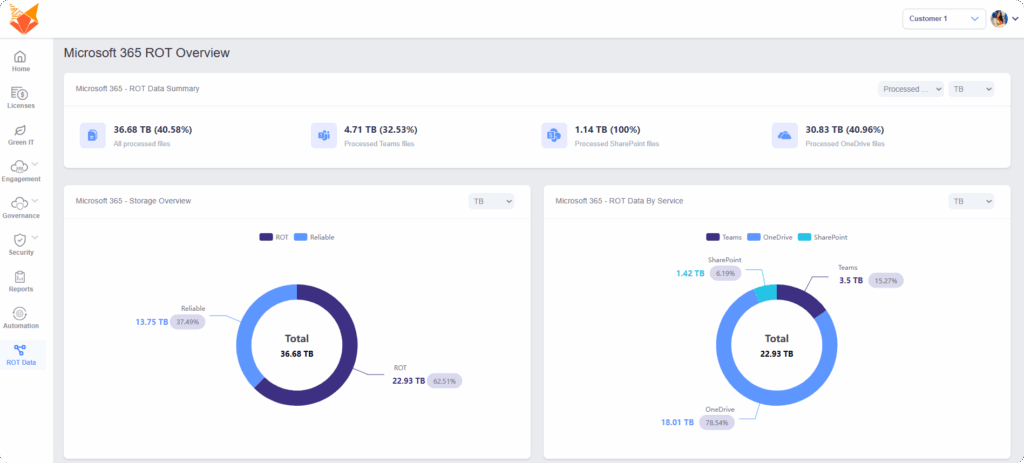
TeamsFox helps organizations map and clean their data using advanced ROT analysis across Teams, SharePoint, OneDrive, and Exchange. Removing ROT data improves AI accuracy and reduces risk.
2- Permissions and Access Management
Imagine Copilot surfacing confidential HR documents to a sales intern — not ideal. The assessment checks:
- Whether permissions are inherited or explicitly granted
- If external sharing is appropriately controlled
- If inactive or former users still have access
Being Ready to Copilot means ensuring users only access what they’re authorized to.
Using TeamsFox’s Permission Features, IT administrators can identify broken inheritance, external sharing risks, and inactive users with access, all before enabling Copilot.
3- Microsoft 365 Governance Policies
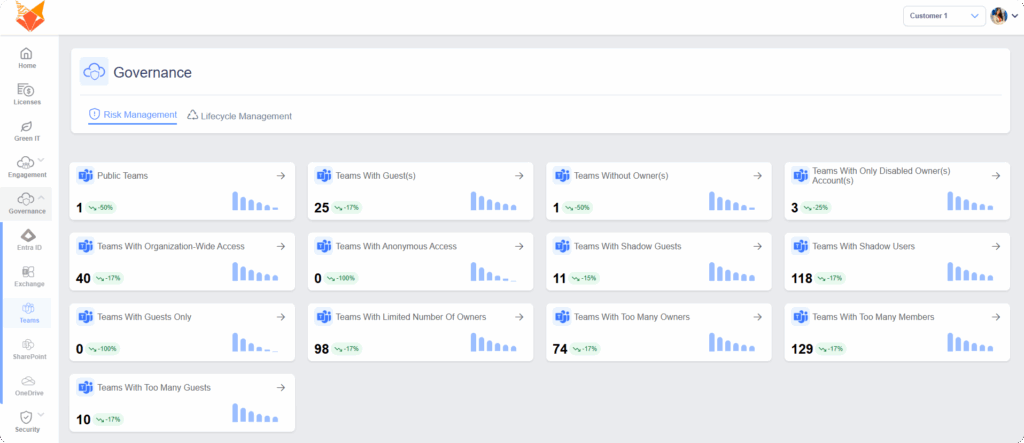
Governance isn’t glamorous, but it’s non-negotiable. The readiness assessment reviews your:
- Naming conventions
- Retention policies
- Data loss prevention (DLP) configurations
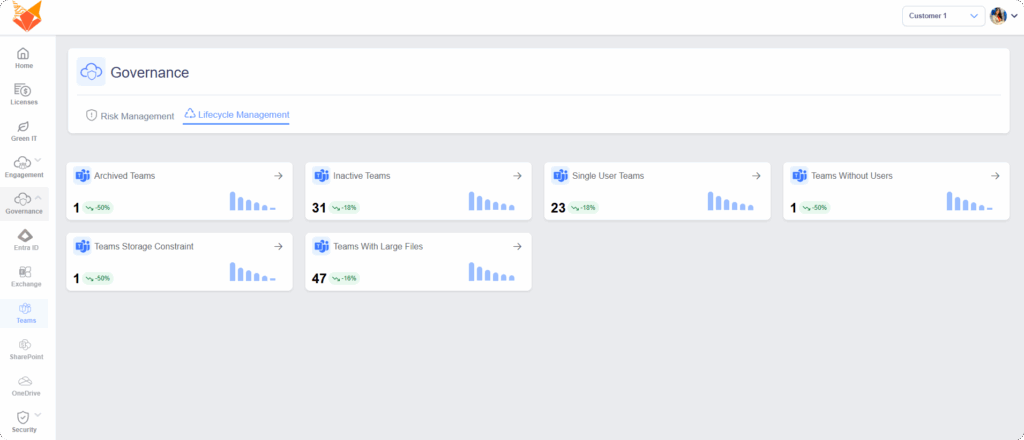
- Teams’ lifecycle management
Through TeamsFox, organizations enforce structured governance by automating workspace lifecycle management, which reduces clutter and boosts Copilot’s effectiveness.
4- Licensing Optimization and ROI
Not every user needs Copilot. Not every license is being used efficiently.
The assessment identifies which users will benefit most and where costs can be reduced.
TeamsFox’s license optimization engine helps clients avoid overspending while enabling strategic Copilot deployment for the right roles.
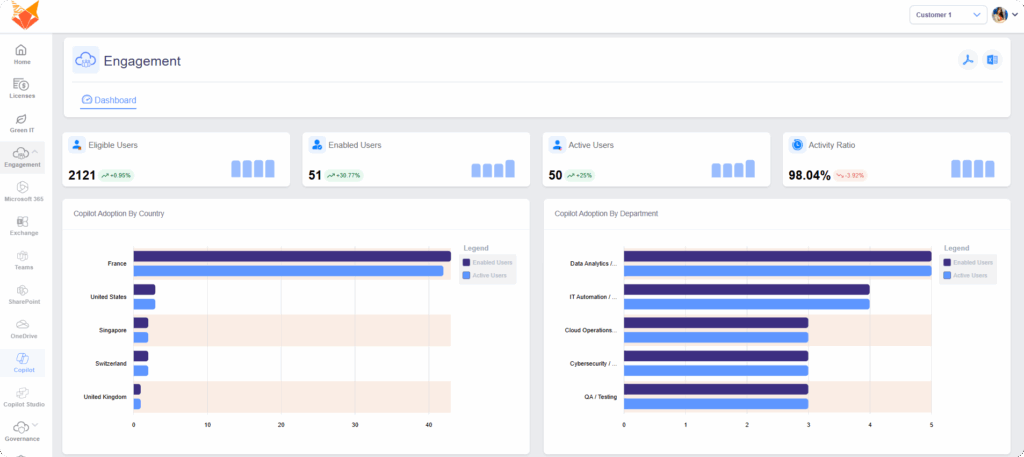
5- Security and Compliance Alignment
Are your security and compliance frameworks aligned with AI integration?
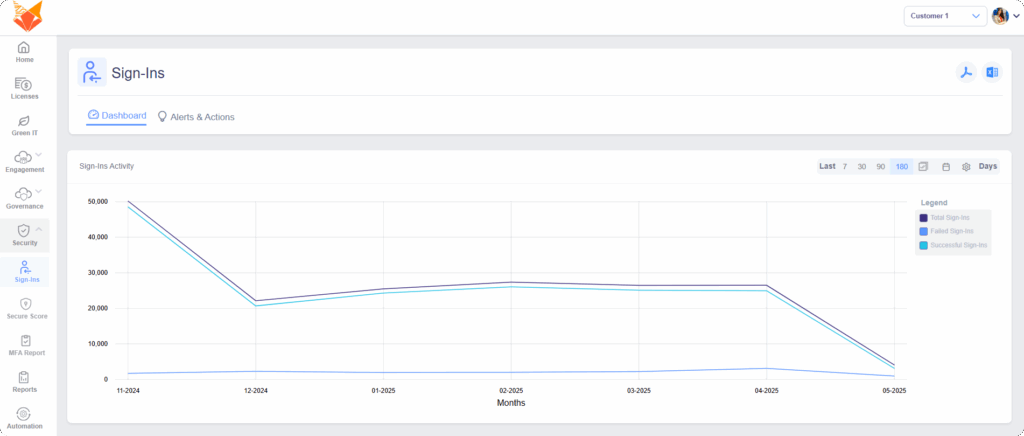
From conditional access policies to insider risk management, security is a pillar of readiness. With regulatory pressure mounting (GDPR, HIPAA, etc.), IT leaders must validate that Copilot won’t become a liability.
TeamsFox offers detailed visibility into access anomalies and compliance gaps, giving clients peace of mind before flipping the Copilot switch.
Risks of Skipping a Copilot Readiness Assessment
1- Data Overexposure
Without proper controls, Copilot might surface confidential documents to the wrong people.
2- Wasted Budget
Unoptimized licensing can cost thousands. TeamsFox clients often discover 10–30% savings pre-deployment.
3- Poor AI Performance
Without structured, clean data, Copilot delivers inconsistent or irrelevant results.
How does TeamsFox support Copilot Readiness?
TeamsFox isn’t just a tool; it’s a readiness accelerator.
Here’s how:
- Visualize and correct access rights in Teams, SharePoint, and OneDrive
- Identify and clean up ROT data
- Automate lifecycle policies to keep workspaces under control
- Optimize license assignments for maximum ROI
- Provide compliance reports to support internal audits
Several TeamsFox clients — from mid-sized firms to large enterprises — have already implemented our solution as a Copilot readiness layer, ensuring a smooth, secure, and efficient AI adoption process.
The Roadmap to Copilot Readiness
Step 1: Baseline Assessment
Start by scanning your Microsoft 365 landscape — users, licenses, files, Teams, and permissions.
Step 2: Gap Analysis
Where are the weaknesses? What would Copilot expose if enabled today?
Step 3: Action Planning
Clean data, adjust access, reinforce governance, and define your pilot users.
Step 4: Deployment Strategy
Roll out Copilot strategically — in phases — to business units that will benefit the most.
Step 5: Continuous Optimization
AI is evolving. Keep monitoring and improving with help from platforms like TeamsFox.
Who Needs a Copilot Readiness Assessment?
- CIOs enabling AI while safeguarding data
- IT Managers ensuring Microsoft 365 hygiene
- Compliance Officers minimizing risk exposure
- Transformation Leaders aligning AI with business strategy
If your organization values control, compliance, and performance, you’re ready to Copilot… with the right preparation.
Final Thoughts: Don’t Deploy Blind
AI should work for you, not against you. Without a readiness plan, Copilot could become a liability instead of a game-changer. A Copilot Readiness Assessment empowers you to move forward with clarity, confidence, and control.
TeamsFox is ready to guide you, and many of our clients have already begun their journey.
The future of Microsoft 365 management starts here.